Studio 1
- You will need to install Eclipse and set up your repository before you can begin this assignment. You can find instructions for installing Eclipse here, and instructions for setting up Git here.
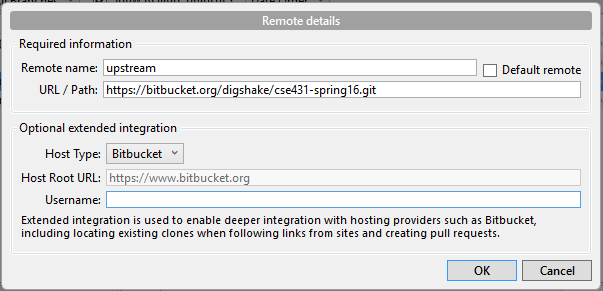
- To get the studio, first make sure you have a remote created that points to the original repository. In the Source Tree program, load your repository then right click Remotes and add a new remote. Add a remote called upstream as shown in the following screenshot:
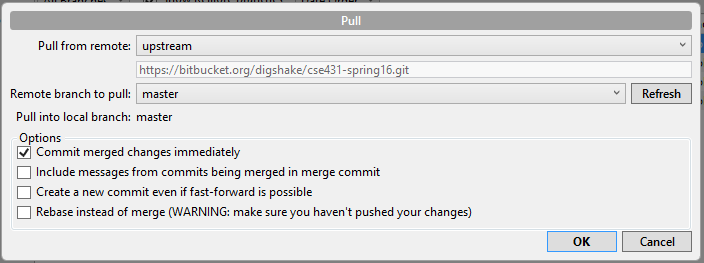
Once you have the remote set up, you need to pull from upstream. To do this, click the pull button at the top, then make sure the master branch of the upstream remote is selected, as shown in the following screenshot:
It will prompt you for your bitbucket user name and password, then pull down the new material. Any time new material is added to the course repository (labs, studios, etc.) you can use a pull to grab a copy of that new material.
To create the project, open eclipse and go to File -> Import. You should see the following window:
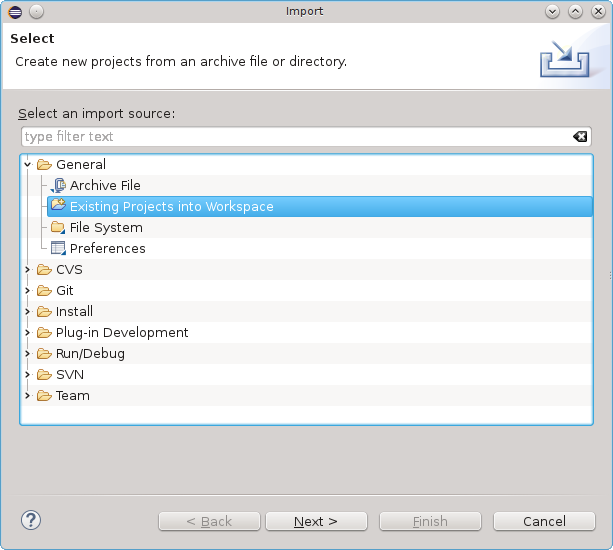
Next, select the "Existing Project" option as shown in the above screenshot. You should then browse for the Studios/1 directory of your repository and select it. - To run the project, find the build.xml file, right click it, and select "Run as -> Ant Build..." A window should pop up that looks like the one below:

Make sure that the "run" target is selected (as shown in the screenshot), then click on the JRE tab. You should now see this window:

Make sure that the "Run in the same JRE as the workspace" option is selected, as shown in the above screenshot. - If you see a BUILD SUCCESSFUL message in the console, then you have run the project correctly. More information about the output of this program is explained below.
In each of the following sections, go as far as you can in the time allotted, but move on to the next section so you'll have a chance to work on each section while in studio.
Setup
1. Open the JFlex Documentation page in a browser window.2. Open the following files:
studio1.jflex -- the scanner specification
TestFiles/input -- the sample input
as you'll be modifying them throughout the session.
3. Upon running this studio code, you should produce some output in the console window.
4. Look at the console output. What do you see and how does it relate to the scanner specification and sample input files?
Spend a few minutes discussing and documenting (in report.txt) your observations.
5. To simplify project navigation, maintenance, and appearance, any automatically generated files are placed in the autogen folder at the outermost level of your project. Any automatically generated Java source files are placed in the autogen src package.
The ant builds should automatically refresh your workspace so that you can see these files.
Take a look at the Yylex source file in the autogen package. This file was automatically generated by JFlex based on the scanner specification in studio1.jflex.
Try to find portions of the Yylex class that correspond to patterns and code that are supplied in the studio1.jflex specification.
7. If you have time, glance at the build.xml file. Discuss and document how it controls the build process you witnessed.
Studio Exercises
For each of the following exercises, add appropriate patterns to the studio1.jflex file and have the action call found to respond to the pattern. Also, add whatever strings you need to the TestFiles/input file so that you can verify that your pattern works as you expect. Be sure to add some counterexamples, to make certain your pattern catches only what you expect.As much as possible, accumulate the patterns, examples, and counterexamples as you move from one exercise to the next, so that you can continue to test that each pattern behaves as it should. In other words, add to your studio1.jflex file a new pattern for each exercise while keeping all the old patterns. At the same time, add to the TestFiles/input file so you can properly test that the patterns you specified work as you expect. Be sure to include examples and counterexcamples of the patterns in the input file.
Also, note that the effects of the patterns you add may be unexpected and may cause you to change things a bit. Document and report what you learn and how you go about getting JFlex to do your bidding.
Part 1 (20 minutes)
1. On seeing the string goodbye, cause the program to terminate (call System.exit(0))2. For each of your first names, have the scanner react or respond to your name in some interesting way.
3. Look at Yylex.java (in the default package, you may have to refresh the workspace to see it) and find where the actions appear that you arranged for the above strings. Document your findings, and compare what you to see to what you code for actions in Lab 1. For patterns you don't match, you see output in the console window. What is producing that output? Try modifying the Yylex.java action for unmatched patterns and see if it works.
To run your modified Yylex file, simply right click the file and select run. Why can't you use the ant file here?
4. Find binary integers that are even (end with a 0)
5. Find binary integers that have at least 2 1s in them
6. Find strings that begin with an h and continue as a binary integer with
* a 1, 2 digits from the end
* a 1, 3 digits from the end
* a 1, 5 digits from the end
* a 1, 10 digits from the end
Report the effects of the above strings on the size of the FSA generated by JFlex.
7. Using the alphabet {a,b,c} find identifiers (strings) of at least length 2 that end with a letter other than the one with which they begin.
8. Same as above, but extend the alphabet to {a,b,c,d,e}
9. Find strings of decimal digits
10. Same as above, but now distinguish
* Strings of decimal digits preceded by "0x"
* Strings of decimal digits that begin with a "0"
* All other strings of decimal digits
11. Look at Yylex.java and report where you see the code using a GOTO table to realize the FSA.
Part 2 (15 minutes)
1. Come up with two simple regular expressions for the same language. Try each separately. What do you notice about the number of states in the FSA that results from each expression? What do you expect to happen for regular expressions that denote exactly the same set?2. Find comments using the regular expression
/- a* -/
where a can be any character at all. What do you expect this pattern to do? What kind of behavior do you see?
3. Now find comments using the regular expression
/- [ (/|c)* -(-)* c ]* (/|c)* -(-)* /What character (or set of characters) does c represent in this regular expression?
4. Try to simplify the regular expression. What is the result on the number of states produced by JFlex?
Part 3 (20 minutes)
We next develop a sequence of expressions that build up components of a programming language such as Java. Develop patterns, examples, and counterexamples for the following:1. Java identifiers (begin with a letter, continue with letters or digits)
2. The keyword if. I want you to try interchanging the patterns for this and the previous pattern in your JFlex file. What behavior do you see?
3. Add 5 or so more keywords and test that it works for you.
4. Now try some Java punctuation:
* +
* ++
* +=
* 3 more of your choosing
5. Java (quoted) strings
6. Comments of both varieties (// and /*... */)
Part 4 (time permitting)
1. Develop an FSA that recognizes binary numbers that are evenly divisible by 5.* Examples: 00, 101, 1010, 1111
* Counterexamples: 01, 1, 100, 11
Turn the FSA into a regular expression, and get JFlex to find such patterns.