Extension for Module 2:
Extension 2.1: Image Processor with Iteration (6 points)
Authors
- Ron Cytron
- Ken Goldman
- Logan Sorentino
Manipulating an Image Raster
In the imagetransforms package, modify the provided Transforms Java program to implement the methods as described below. Your methods will use iteration (either while loops or for loops) to operate on the pixels of a picture.
Notes
-
To run this extension, right (control) click on Main and choose Run as… then Java Application.
This extension uses the same base code as the filter extension.
-
The Picture class is a Sedgewick class whose API is documented on page 720 of our text. The coordinates are expressed using the standard in computer science graphics: the coordinate (x,y) denotes the pixel that is
- x pixels to the right of the leftmost edge of the picture
- y pixels down from the top edge of the picture
Thus, (0,0) is the top left corner of the picture.
-
Pixel addressing follows the common Java convention: if there are w horizontal pixels, then 0 is the first (leftmost) and w-1 is the last (rightmost).
-
Almost all of the methods are written in terms of two Picture parameters:
- source: the picture to be used as input to your transformation
- target: the picture area to be used as output from your transformation
There is just one exception: the gradient method produces its output without needing a source. Its only parameter is target.
-
Each Picture has a width and a height, and these can be obtained for a Picture p as follows:
int width = p.width(); int height = p.height(); -
To find the Color of a pixel at location x,y, you use
Color c = source.get(x,y); -
To set the Color of a pixel at location x,y to the color c, you use
target.set(x,y,c);
Instructions
Each of the methods described below is found in the Transforms class.
-
The provided method flipHoriz(Picture source, Picture target) flips the image horizontally.
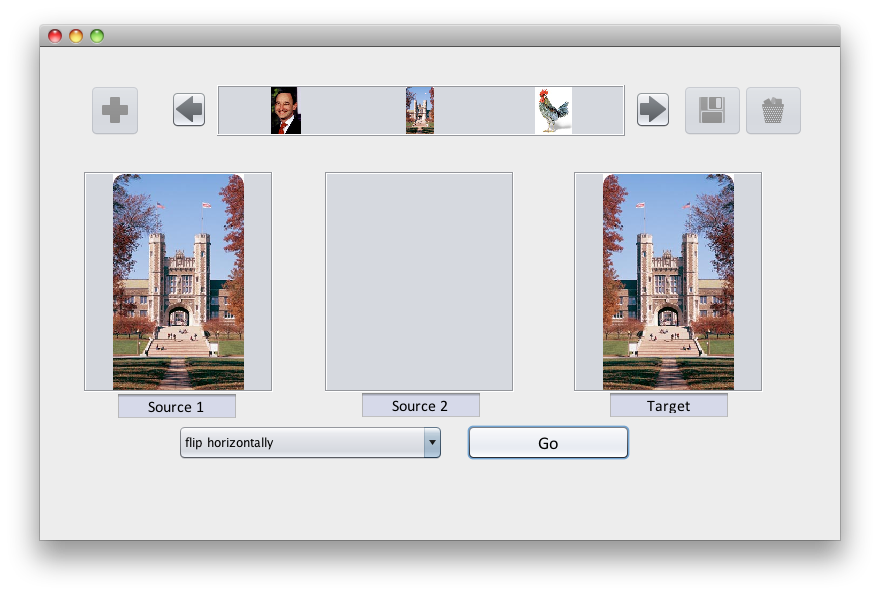
Look at the code given to you for this example carefully. It is broken into simple steps and the comments help explain why the pixel indexing works.
-
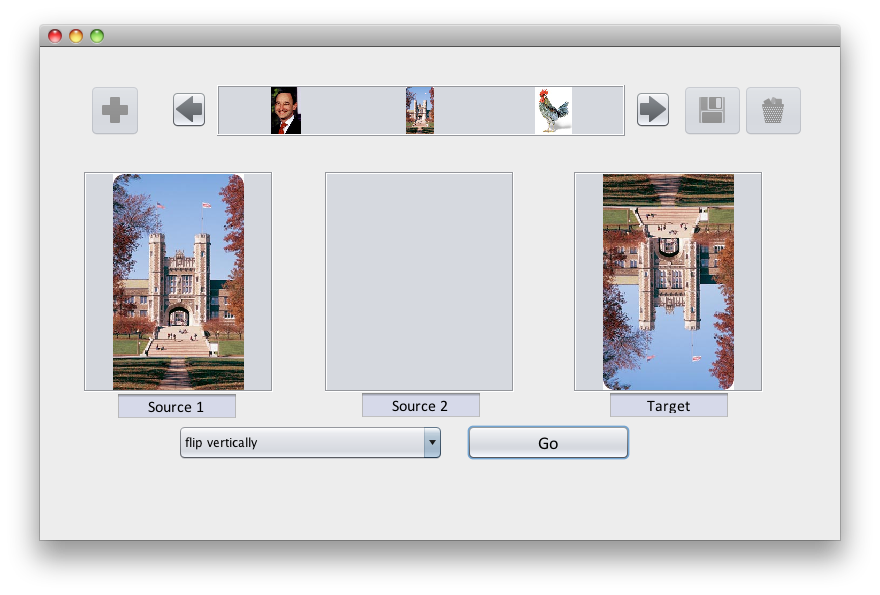
Complete the method flipVert(Picture source, Picture target) that flips the image vertically.
-
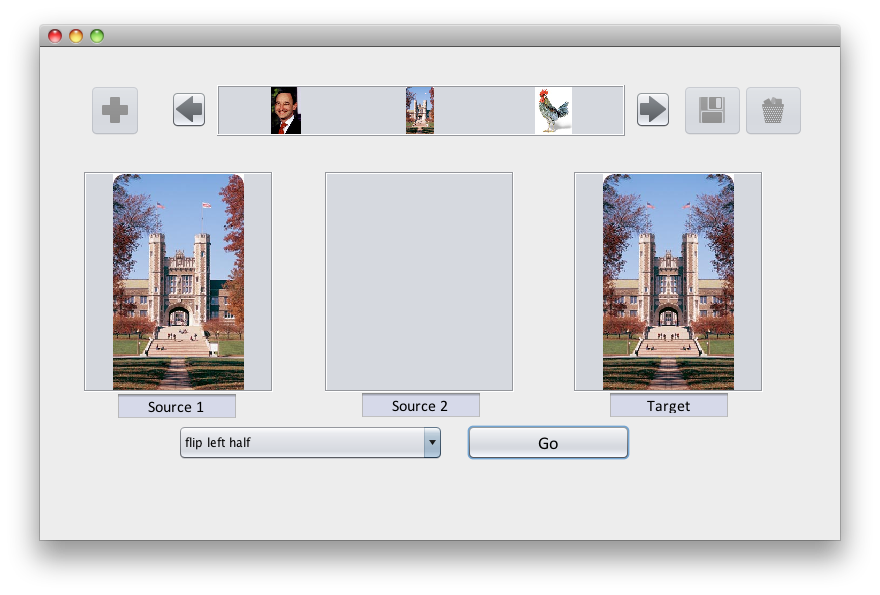
Complete the method flipHorizLeftHalf(Picture source, Picture target) that flips the left half of the image horizontally.
The left half of the target image should be same as the source, but the right half of the target image should be the mirror of the left half of the source.
-
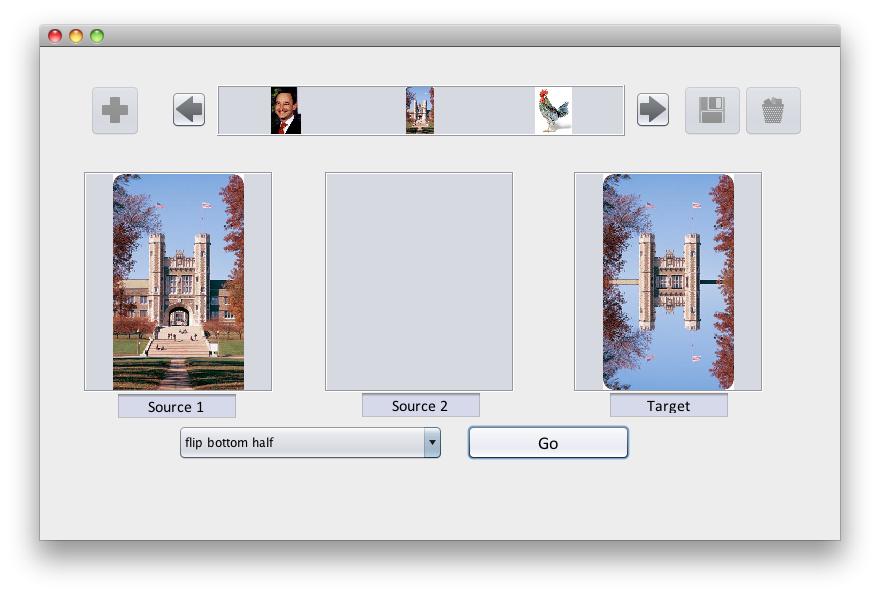
Complete the method flipVertBotHalf(Picture source, Picture target) that flips the bottom half of the image vertically.
-
Complete the method gradient(Picture target) that takes a single Picture as a parameter.
Your code should create a color gradient by computing the following for each pixel:
- The amount of red in each pixel increases gradually from 0 at the left edge of the image, to 255 at the right edge of the image.
- The amount of green in each pixel increases gradually from 0 at the top edge of the image, to 255 at the bottom edge of the image.
- The amount of blue in every pixel should be 128.
Thus, each pixel will have a different color depending on its position. For example, the pixel at the top left will have red=0, green=0, and blue=128. The pixel about 1/4 of the way down on the right edge will have red=255, green=64, and blue=128.
Develop an expression for the amount of red and green in each pixel, given the x and y position of that pixel and the width and height of the image:
int amountRed = .....int amountGreen = ....Then set the pixel at (x,y) to a color based on those computations:
target.set(x, y, new Color(amountRed, amountGreen, 128));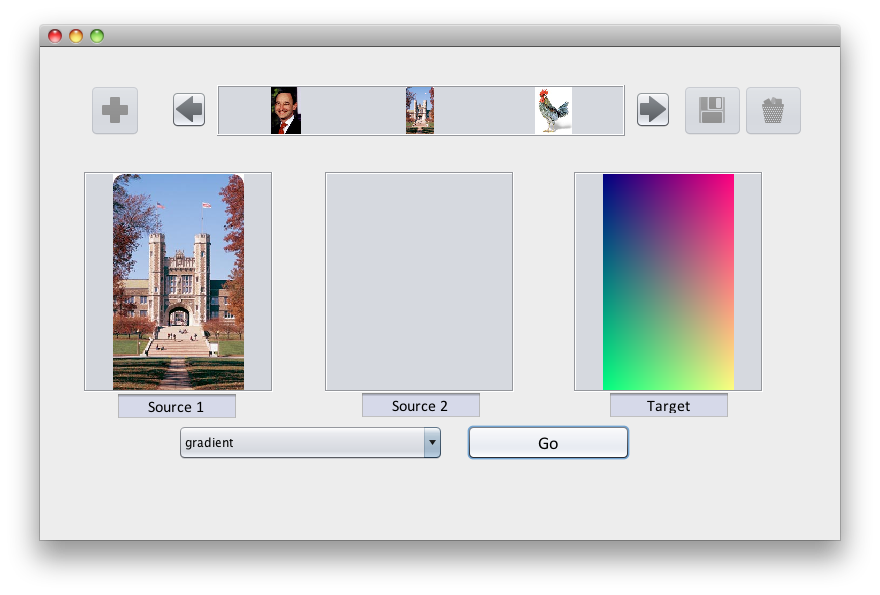
Submitting your work
To submit your work, contact the instructor or a TA. They will walk you through the submission process. Be prepared to show them the work that you have done and answer their questions about it!
Extension 2.2: One-Rep Max Weight Calculator (3 points)
Authors:
- Devin Goodkin
- Ron Cytron
Disclaimer:
The values computed in this assignment are based on published formulas, but you are advised to undertake this and all forms of exercise with the advice and consent of a physician.
In particular, performing a one-rep max movement unprepared or unsupervised can result in injury.
You are therefore especially cautioned against that form of training without adequate supervision and coaching.
The authors of this extension and all personnel involved with this course are not licensed medical care providers; they represent that they have no exepertise in diagnosing, examining, or treating medical conditions of any kind, nor in determining the effects of any specific exercise.
The data computed by this exercise are for informational and instructional purposes only.
Overview
In weight training, the volume of work completed in one exercise (often called a set) is typically specified as a given weight that is moved a specified number of times. These are respectively called the weight and reps (abbreviates repetitions) of that set.
In this extension, you will create a one-rep max calculator. This calculator hypothetically calculates a weight that a subject could move for one repetition, given that the same subject can successfully complete r reps (in the range of 2 -> 12) at a lighter weight.
Beyond 12 reps, the formula we use is not considered accurate.
The stated value for r is generally considered to be the number of times the weight can be moved before failure: the subject can complete r reps at the stated weight, but no more.
While a person may never attempt that one-rep max movement, the one-rep max weight is canonical, in that it can then be used to compute lighter weights that should be feasible for the subject at a desired number of reps.
Your solution will compute and print:
- The one-rep max weight based on a formula described below.
- The weight that should be feasible for a stated number of reps.
- Percentages of the one-rep max weight from 95% to 50% in decrements of 5%.
Example
Consider a subject who can successfully bench 225 pounds 10 times before failure.
- What is this subjects current one-rep max bench weight?
- How much weight should that subject be able to bench to get 5 reps before failure?
- What percentage of this subject's max bench is the weight that can be benched 5 times?
Input
- Successful weight: 225 pounds
- Successful reps: 10
- Desired reps: 5
Output
One-rep max: 300
Weight for 5 reps: 255
95% 1 RM: 285
90% 1 RM: 270
85% 1 RM: 255
80% 1 RM: 240
75% 1 RM: 225
70% 1 RM: 210
65% 1 RM: 195
60% 1 RM: 180
55% 1 RM: 165
50% 1 RM: 150
Procedure
-
First take a look at this one-rep max caculator.
-
If you try it for some sample values, you will see that it produces results that may not work in an actual gym, because the smallest plate one can find in most gyms is 2.5 pounds.
-
Our calculator takes in a third input, which is how many reps the person wants to perform, and calculates a weight to be performed at that number of reps.
-
Our one-rep max calculations will be based on the Epley Formula, so study that material sufficiently well to complete this extension.
-
Create a OneRepMax class in the onerepmax package of the extensions folder.
-
Arrange for that program to prompt the user for the inputs needed for this computation.
-
Compute and print the results as shown in the sample ouptut above for the inputs provided in the run of your code.
-
You must:
- Check that the inputs provided are reasonable. Print a suitable message and exit if any inputs are unreasonable.
- Use iteration to produce the table of percentages of the one-rep max weight.
- Produce weight values that are rounded to the nearest 5 pounds, so that the least weight needed on a bar is 2.5 pounds on each side.
Submitting your work
To submit your work, contact the instructor or a TA. They will walk you through the submission process. Be prepared to show them the work that you have done and answer their questions about it!
Extension 2.3: Rock, Paper, Scissors (5 points)
Authors
The game of Rock-Paper-Scissors (hereafter, RPS) is a two-player game that can be used to avoid boredom and to settle disputes.
In this lab you will simulate two players: one plays randomly while the other rotates faithfully from rock to paper to scissors. Your task is to simulate this game and to report the fraction of games won by each of the two players.
Procedure
Find the RockPaperScissors package in the labs source folder.
Create a new class RPS there, and you are ready to begin your development.
It is suggested that you develop code in small steps, so that you can proceed from confidence to confidence, and not have a big pile of untested code to debug at the end.
To help motivate this approach, the TAs will not help you unless you have shown progress based on these steps. Ask for help as soon as you need it, but please follow the steps below > so that you can gain confidence.
The steps you might consider are as follows:
-
What inputs does your program need? First, get your program to accept those inputs and print them out so you can see they are set properly.
This means that you should type in the code to prompt the user for the input(s), print out the values of those inputs, and that's all for now. Run your program at this point and make sure it is behaving as you want. What inputs do you need? There's no reason to ask for more than is necessary. At a minimum, you have to know how many rounds of RPS to play before printing the resulting statistics
-
Next, create a loop that simply iterates the desired number of times.
Again, run your program. You may want to print something out in your loop so you can verify that the loop works correctly.
-
You next can make the concept of the random player real. This means declaring a variable name of a suitable type to represent this concept, establishing the variable's initial value.
What is the concept of the player? There are many details about the player that appear unnecessary: the player's name, address, cell phone number.
On the other hand, if we are going to play RPS, we need to know what move the player > has made. This is the important concept.
How do we represent the choice of rock, paper, or scissors? This is left up to you, so try for something simple. It may help to recall how Paul Revere was (poetically) told of how the British were coming: one if by land, two if by sea.
In otherwords, an
intencoded the manner of invasion.If there were only two choices, why didn't Paul use a
boolean? Sadly, Bool was not yet born -
In your loop, you should modify this variable's value to reflect the associated player choosing randomly among rock, paper, and scissors each iteration.
You've seen how to use the random number generator to pick between two outcomes. Now you must pick between three.
-
Run your program and verify that the player is choosing randomly.
-
OK, now for the other player. This player must cycle among rock, paper, and scissors. Let's make this player real by declaring a variable name of a suitable type and establishing its initial value.
In the interest of consistency and simplicity, you should use the same encoding for this player in terms of what value means rock, what value means paper, and what value means scissors.
-
In your loop, arrange for this player to choose its next move based on its previous move. If the move used to be rock, it's now paper. If the move used to be paper, it's now scissors. If the move was scissors, it's now rock.
-
Run your program again and make sure the cycling player is behaving properly.
To verify the cycling player's behavior, you will probably want to print out the values representing that player's move each iteration.
It won't take many iterations to see if this is working or not: 10 should do.
-
Each player has made a move; now let's see who won. First, pick a name, type, and initial value for the number of wins a player has. Do the same for the other player.
Why do we need a variable to keep track of each player's wins? Why not keep track of only one player's wins and assume the other player won the other rounds?
-
In the loop, determine who won based on the current value of each player's move.
Use the rules of RPS to adjudicate the winner, and credit the win count properly.
-
After the loop completes, report the fraction of wins awarded to each of the two players.
-
Test your code by trying it with just one iteration, two iterations, and three iterations. Make sure it's working before you set it loose.
-
Run your code several times, each on 1000 iterations.
-
Based on what you see, did one player tend to win more often than the other?
Submitting your work
To submit your work, contact the instructor or a TA. They will walk you through the submission process. Be prepared to show them the work that you have done and answer their questions about it!
Extension 2.4: Bank Interest Calculator (4 points)
Authors
- Brennan Morell
- Jarett Gross
Background
In this assignment, you have a balance in your bank account and you randomly either deposit or withdraw money from your account every day for one month (30 days). At the end of the month, you receive interest on your balance.
Procedure
-
You start with $4000 in your bank account and earn 2% interest at the end of the month.
-
Each day, you always withdraw or deposit money. Half of the time you withdraw $100.00 and the other half of the time you deposit $200.50.
How would you use random numbers to determine whether you withdraw or deposit money?
-
After withdrawing or depositing money, calculate your new balance. Then print the following: Day, Type, Amount, Balance in a cleanly formatted table.
Since the cent is the lowest denomination in U.S. currency, round your withdrawals, deposits, and balance to the nearest cent.
-
Finally, after the 30th day, calculate and print the amount of interest you earned and your final balance.
Your final output should look similar to this:
Day	Type		Amount		Balance
1	Deposit 	$200.50		$4200.50
2	Withdraw	$100.00		$4100.50
3	Deposit 	$200.50		$4301.00
4	Deposit 	$200.50		$4501.50
5	Withdraw	$100.00		$4401.50
6	Deposit 	$200.50		$4602.00
7	Withdraw	$100.00		$4502.00
8	Deposit 	$200.50		$4702.50
9	Withdraw	$100.00		$4602.50
10	Withdraw	$100.00		$4502.50
11	Deposit 	$200.50		$4703.00
12	Deposit 	$200.50		$4903.50
13	Deposit 	$200.50		$5104.00
14	Withdraw	$100.00		$5004.00
15	Withdraw	$100.00		$4904.00
16	Withdraw	$100.00		$4804.00
17	Deposit 	$200.50		$5004.50
18	Deposit 	$200.50		$5205.00
19	Deposit 	$200.50		$5405.50
20	Deposit 	$200.50		$5606.00
21	Withdraw	$100.00		$5506.00
22	Deposit 	$200.50		$5706.50
23	Deposit 	$200.50		$5907.00
24	Withdraw	$100.00		$5807.00
25	Deposit 	$200.50		$6007.50
26	Deposit 	$200.50		$6208.00
27	Deposit 	$200.50		$6408.50
28	Withdraw	$100.00		$6308.50
29	Withdraw	$100.00		$6208.50
30	Withdraw	$100.00		$6108.50

Interest earned: 122.17
Money after one month\'s interest: 6230.67
Submitting your work
To submit your work, contact the instructor or a TA. They will walk you through the submission process. Be prepared to show them the work that you have done and answer their questions about it!
Extension 2.5: Mario (4 points)
Authors:
- Nathan Vogt
- Elie Schramm
Mario, created in 1981 by Nintendo, is a classic video game starring the fictional Italian character Mario. In the assignment, loops printing hashtags will be used to build the block mountains as seen in the picture.

Create Mountain Blocks in Mario using loops. Test all your loops on mountains of various sizes.
Hint: You many want to use underscores for spacing the blocks correctly before substituting spaces.
This can be accomplished by printing each line or character separately, or by adding all the spaces and hashtages to one large String. Using “\n” in a String causes a line break. So, for example:
String s = "one" + "\n" + "two";
prints out to:
one
two
- Create a mountain that ascends to the right, as shown in the example for a size 5 mountain.
	    #
	   ##
	  ###
	 ####
	#####
- Create a mountain that descends to the right, as shown.
	#
	##
	###
	####
	#####
- Make a mountain that resembles the original mountain flipped upside down. Ex:
    #####
     ####
      ###
       ##
    	#
- Make a mountain that resembles the second one upside down. Ex:
    #####
    ####
    ###
    ##
    #
Submitting your work
To submit your work, contact the instructor or a TA. They will walk you through the submission process. Be prepared to show them the work that you have done and answer their questions about it!